DJ Software for Windows: Build DJ Mixes on Your PC
DJ.Studio is DJ software for Windows 10 and Windows 11 that builds mixes on a timeline. You add full tracks, DJ.Studio analyses their BPM and key and beat-matches them, and you refine every transition with a mouse and keyboard before you export the finished mix. No DJ controller is needed.
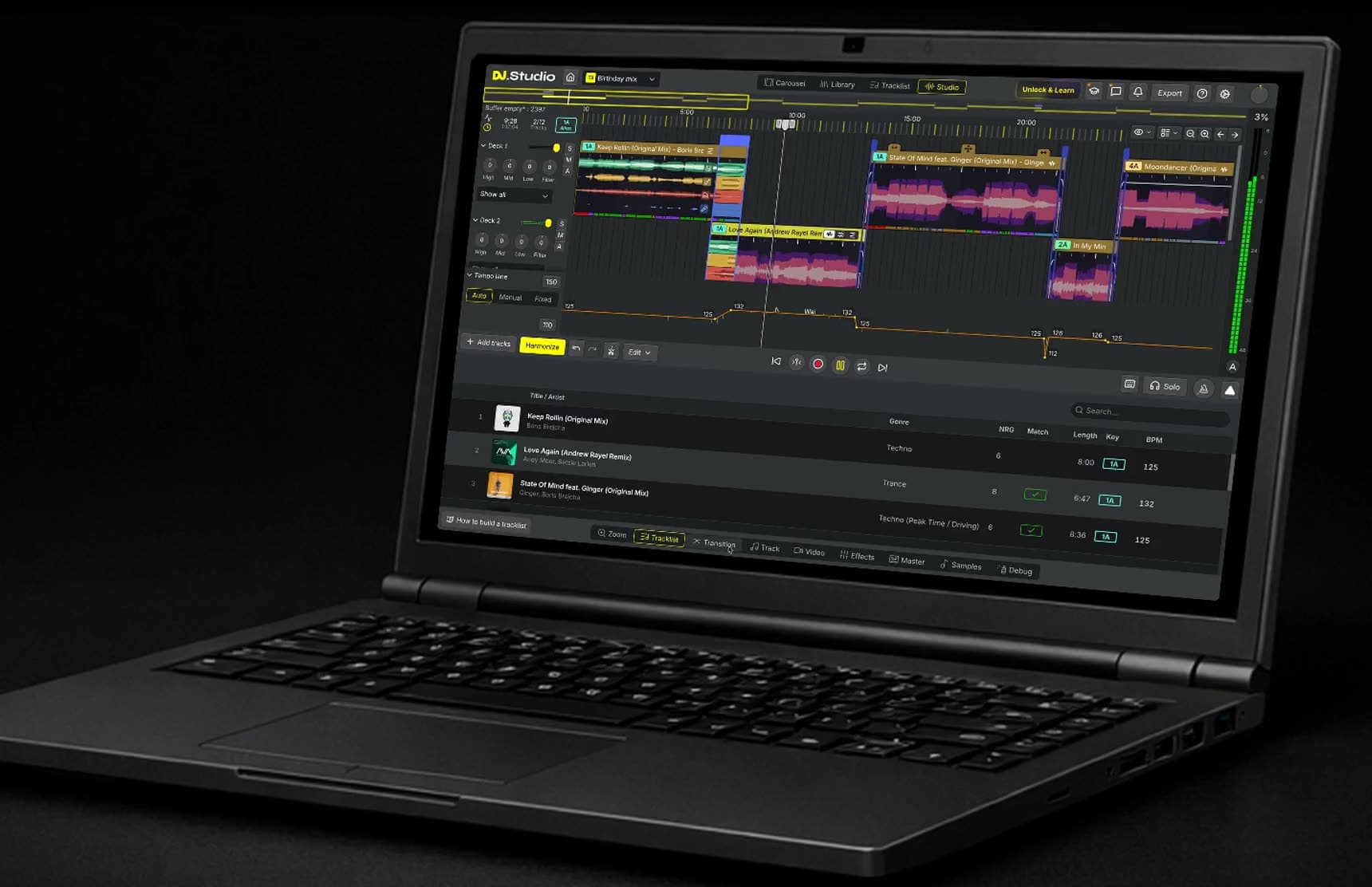
Build your mix on a timeline, not on decks
Most DJ software for PC recreates a pair of decks and a mixer, so a mix has to be played and recorded in real time. DJ.Studio is a different kind of DJ app: it works like a DAW for DJ mixes. Every track sits on a timeline, where you move, cut, loop and layer it until each transition sounds right. You can change the tempo of single tracks or of the whole mix, automate volume, EQ, filters and effects, and add samples, all on your Windows PC or laptop.
DJ.Studio vs VirtualDJ, rekordbox, Serato, and Traktor on Windows
The best-known live DJ programs on Windows, side by side with DJ.Studio:
DJ.Studio | VirtualDJ | rekordbox | Serato DJ Pro | Traktor Pro 4 | |
|---|---|---|---|---|---|
How you mix | On a timeline, with every transition editable | Live on virtual decks | Live on virtual decks | Live on virtual decks | Live on up to four decks |
DJ controller | Not supported | Very wide support | Supported, built around AlphaTheta (Pioneer DJ) gear | Works with supported controllers | Supported, mostly Native Instruments hardware |
Stem separation | Built in | Built in (Stems 2.0) | Built in | Built in (Serato Stems) | Built in |
Finished mix | Exported as a file, faster than real time | Recorded while you play | Recorded while you play | Recorded while you play | Recorded while you play |
Free option | 7-day trial, no credit card | Free for non-professional use without a controller | Free plan | Serato DJ Lite (free) | None, one-off purchase |
For gigs with a controller, a deck-based program is the right tool. DJ.Studio prepares the set: you build and test it on the timeline, then export the playlist to VirtualDJ, rekordbox, Serato DJ, or Traktor.
How to make a DJ mix on Windows with DJ.Studio
From your music library to a finished mix in four steps.
1. Import your music
Install DJ.Studio for Windows, start the free trial and add music files from your PC or a playlist from your DJ software.
2. Order with Harmonize
Harmonize suggests a track order based on key and BPM and places beat-matched transitions between the songs.
3. Fine-tune the timeline
Adjust the timing, volume, EQ, filters, effects and stems of every transition until the mix sounds right.
4. Export your mix
Save the mix as an audio or video file, or send the playlist back to your live DJ software. Exporting requires a paid plan.
Order your playlist by key and BPM with Harmonize
Harmonize reads the key and BPM of every track and works out an order in which neighbouring songs fit together harmonically. Options such as Fuzzy key mixing (safe, closely related keys) and Mood key mixing (bolder key changes) let you decide how strictly it follows the Camelot wheel. Use the result as a starting point and change any part of it on the timeline.
Works with the DJ software you already use
DJ.Studio reads your existing library. Connect rekordbox, Serato DJ, Traktor, VirtualDJ, Engine DJ, Mixed In Key, or Apple Music (iTunes), or add music files straight from your PC.
When the mix is ready, send the arranged playlist back to your live DJ software, so you can prepare a set at your desk and play it on your own setup. DJ.Studio can also mix tracks from Beatport and Beatsource streaming, and match a public Spotify playlist to those catalogues.
Stem separation, effects and video on your PC
Stem separation splits each track into vocals, drums, bass and melody, so you can build a transition around an acapella or an instrumental. It runs locally, so your music never leaves your computer. On Windows, an NVIDIA graphics card with CUDA makes separation much faster than processing on the CPU alone. Stems and video work need 16 GB of RAM.
You can also add effects, samples and VST plugins, and turn the mix into a video with audio-reactive visuals and track information.
DJ with just a laptop
You can make a complete DJ mix on a Windows laptop with nothing plugged in but headphones. Arrange the tracks on the timeline with a mouse or touchpad, adjust each blend, and export the mix as a file. For stem separation, use a laptop with 16 GB of RAM; the requirements below list the rest.
Export the finished mix
Because DJ.Studio renders the mix instead of recording it live, a mistake never forces you to start over. Export the result as MP3, WAV or FLAC audio, as an MP4 video, as a Mixcloud upload with tracklist, or as an Ableton Live project for further editing. You can also export the arranged playlist as a set for your live DJ software.
Export options depend on your plan and on the source of your tracks, so check the current details before you rely on a specific format.
What you can make with DJ.Studio on Windows
Four kinds of projects DJs build with DJ.Studio on a PC or laptop.
Mashups
Put the vocal of one song over the instrumental of another with stem separation and Mashup Mode, then fine-tune the blend on the timeline.
Radio shows and podcasts
Build a show with a clean tracklist, upload it to Mixcloud, or open it in Ableton Live to add voice-overs and jingles.
Video mixes
Turn a finished mix into an MP4 with audio-reactive visuals and track titles, ready for YouTube or social media.
Live sets
Plan the order and transitions of your next gig, then export the set to rekordbox, Serato DJ, Traktor, VirtualDJ or Engine DJ and play it live.
Who DJ.Studio for Windows is for
Made for Windows users who build mixes rather than perform them live.
Bedroom DJs
No controller needed. Build complete mixes on your PC with a mouse and keyboard.
Radio hosts and podcasters
A new show every week. Prepare each episode on a timeline and export it faster than real time.
Club and mobile DJs
Prep at home. Prepare sets for clubs, weddings and parties, then play them live in rekordbox, Serato DJ, Traktor or VirtualDJ.
Fitness instructors
Gapless class mixes. Turn a class playlist into one continuous mix without gaps between tracks.
Trusted by working DJs
Used by over 360,000 DJs worldwide, from bedroom mixers to touring artists.
DJ.Studio brings production style workflows to DJs.
DJ.Studio is a great tool for quickly assembling mixes--and for finding which tracks work well together for live DJ sets ... It solves a lot of problems for busy DJs and helps me get through more music.
System requirements for Windows
DJ.Studio runs on Windows 10 and Windows 11. These are the minimum specs for a Windows PC or laptop.
OS Windows 10 or higher | Memory 8GB of RAM or more |
CPU Intel Core i7, or an AMD processor newer than 2017 | Hard disk/SSD 4GB or more of free space, not counting your music files |
Sound Audio output to speakers, headphones, etc. (internal or external audio device) | Playable music file ALAC, FLAC, WAV, AIFF, MP3, AAC |
Display resolution 1280 × 768 or greater | Browser Chrome (updated to the latest version) |
Internet connection An internet connection is needed to create a DJ.Studio account and to download the software. |
Buying a new PC for DJ.Studio? DJ.Studio recommends an Intel Core i7 or equivalent from 2021 or later, 16 GB of RAM and an SSD. An NVIDIA GPU with CUDA speeds up stem separation.
Also mixing on a Mac? Your DJ.Studio license works on both your Mac and your Windows machine. See DJ.Studio for Mac or the full system requirements.
Questions about DJ.Studio on Windows
- Does DJ.Studio run on Windows 10 and Windows 11?
Yes. DJ.Studio requires Windows 10 or higher, so it runs on Windows 10 and Windows 11 PCs and laptops.
- Do I need a DJ controller to use DJ.Studio on a PC?
No. You work with a mouse and keyboard, and DJ.Studio has no controller connectivity. It is built for preparing and exporting mixes, not for live performance.
- Is there a free version of DJ.Studio for Windows?
No. DJ.Studio is paid software with a free 7-day trial of the Pro+Stems features, without a credit card. Exporting unlocks with a paid plan.
- Can I DJ live with DJ.Studio on a Windows laptop?
DJ.Studio isn't built for live performance. Prepare and test the set on your laptop, then export the playlist to rekordbox, Serato DJ, or VirtualDJ and play it live from there.
- Can I use DJ.Studio with rekordbox, Serato DJ or VirtualDJ on Windows?
Yes. Import playlists from rekordbox, Serato DJ, Traktor, VirtualDJ or Engine DJ, build the mix in DJ.Studio, then send the arranged playlist back to your live DJ software.
- Can I use one DJ.Studio license on Windows and Mac?
Yes. A DJ.Studio license lets you mix on both a Windows PC and a Mac. The one-off license covers one user on two machines.
- Does DJ.Studio work with Apple Music or iTunes files on Windows?
Yes, with tracks you own. Connect your Apple Music or iTunes library and DJ.Studio uses the music files stored on your PC. Songs streamed from an Apple Music subscription can't be mixed.
- What are the system requirements for DJ.Studio on Windows?
Windows 10 or higher, at least 8 GB of RAM (16 GB for stems and video), an Intel Core i7 or an AMD processor newer than 2017, and 4 GB of free disk space. The full list is in the system requirements above.
Start building mixes on your Windows PC
Download DJ.Studio and try the Pro+Stems features free for 7 days, without a credit card. Exporting is not possible during the trial, and the trial does not turn into a paid plan by itself.
Trial terms and plans can change, so check pricing for the current options.