DJ Software for Mac: Build DJ Mixes on Your Mac
DJ.Studio is a timeline-based DJ app for Mac. Drop in full tracks and DJ.Studio detects their tempo and key, lines up the beats and suggests transitions; you shape each blend with your trackpad or mouse and export the result. It runs on Apple Silicon (M1 to M5) and Intel Macs, and you do not need a DJ controller.
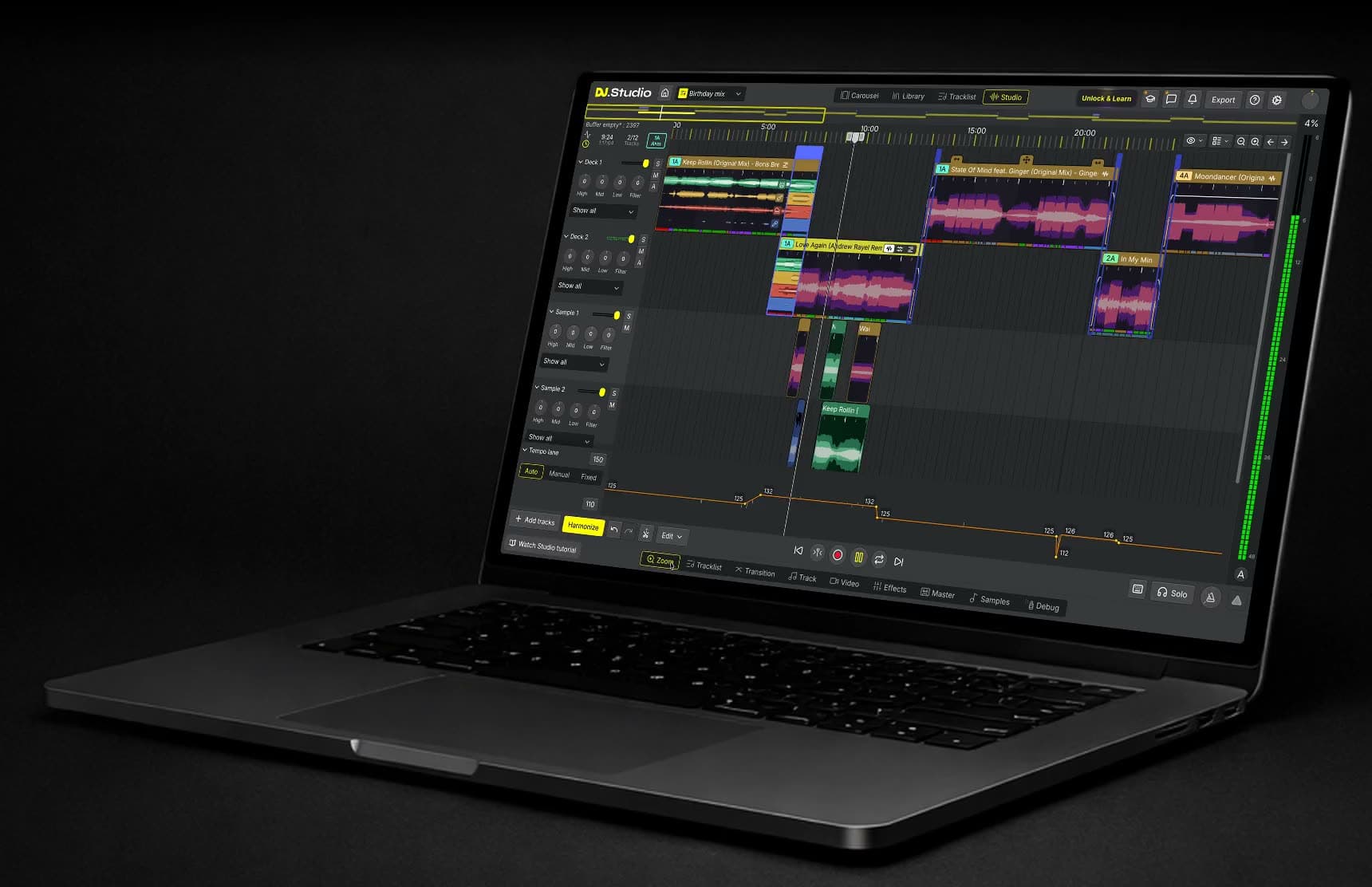
A timeline editor for DJ mixes on your Mac
Most Mac DJ software gives you two virtual decks and expects you to perform the mix in real time. DJ.Studio is a different kind of DJ app for Mac: the whole set is laid out from start to finish, so you see every transition at once. Drag a track to change where it starts, trim intros and outros, loop a section or stack a sample on top. Tempo can follow a single track or change across the whole set, and volume, EQ, filter and effect changes are drawn as automation, so every move is repeatable and easy to undo.
DJ.Studio vs djay Pro, rekordbox, and Serato on Mac
How DJ.Studio compares with three popular live DJ apps for Mac:
DJ.Studio | djay Pro | rekordbox | Serato DJ Pro | |
|---|---|---|---|---|
How you mix | On a timeline, transition by transition | Live on virtual decks | Live on virtual decks | Live on virtual decks |
DJ controller | Not supported | Supported | Supported, built around AlphaTheta (Pioneer DJ) gear | Works with supported controllers |
Stem separation | Built in | Built in (Neural Mix) | Built in | Built in (Serato Stems) |
Finished mix | Rendered to a file, faster than real time | Recorded while you play | Recorded while you play | Recorded while you play |
Free option | 7-day trial, no credit card | Free version, PRO subscription for more features | Free plan | Serato DJ Lite (free) |
If you perform with a controller, one of the deck-based apps is the better choice. DJ.Studio exports the finished playlist to rekordbox or Serato DJ, so you can prepare a set here and play it there. Our comparison of 11 DJ apps for Mac covers each one in detail.
How to make a DJ mix on a Mac with DJ.Studio
Four steps from a folder of tracks to a mix you can share.
1. Add your music
Download the Mac app, start the trial and add music files you own from Finder, your Apple Music library or the DJ software you already use.
2. Let Harmonize sort the set
DJ.Studio checks every track's key and tempo and proposes an order that flows, with transitions already in place.
3. Shape each transition
Zoom in on any blend and set where it starts, how long it lasts and which EQ, filter, effect or stem moves happen.
4. Render and share
Render the set to an audio or video file, or hand the playlist to your live DJ software. Exporting is part of the paid plans.
Let Harmonize find the track order
Picking a running order by ear can take hours. Harmonize compares the key and tempo of every song in your playlist, builds an order that stays harmonically compatible and drops beat-matched transitions between the tracks. With Fuzzy and Mood key mixing you choose between safe, closely related keys and bolder key changes. You can still rearrange any track afterwards.
Works with your Mac music library and DJ software
Bring in playlists from rekordbox, Serato DJ, Traktor, VirtualDJ or Engine DJ, drag files in from Finder, or open your Apple Music library to use the songs you own.
Finished sets go back out the same way: export the ordered playlist to your live DJ software and play it at the gig. If you stream, DJ.Studio also works with Beatport and Beatsource and can look up the tracks from a public Spotify playlist in those catalogues.
Stem separation on your Mac
Want an acapella over an instrumental, or the drums of one track under the vocal of the next? Stem separation splits songs into vocals, drums, bass and melody right on your Mac, without uploading anything. It works on both Apple Silicon and Intel Macs. On Apple Silicon the GPU does the work, at roughly 6 to 30 times realtime; on an Intel Mac the CPU handles it, which takes longer. Plan on 16 GB of RAM for stems.
Effects, samples and VST plugins can be added to any transition as well.
DJ with just a MacBook
A MacBook and a pair of headphones are enough to make a DJ mix in DJ.Studio. There's no controller or mixer to set up: you place tracks on the timeline with the trackpad, listen back to each transition, and render the result.
Export the finished mix or a music video
There is no record button to hit and no take to get right: DJ.Studio renders the finished timeline. Save it as MP3, WAV or FLAC, upload it to Mixcloud with the tracklist filled in, or open it as an Ableton Live project to keep editing. The ordered playlist can also go to your live DJ software as a ready-made set.
Publishing on YouTube or social media? Render an MP4 with audio-reactive visuals and track titles. Which formats are available depends on your plan and on where your tracks come from.
What you can make with DJ.Studio on a Mac
Four kinds of projects you can build with DJ.Studio on a Mac.
Mashups
Separate vocals, drums, bass and melody, then layer parts of different songs in Mashup Mode until the mashup works.
Radio shows and podcasts
Produce a weekly show on your MacBook, publish it on Mixcloud with the tracklist, or finish it in Ableton Live.
Video mixes
Render your mix as a music video with visuals that react to the audio and show each track title.
Live sets
Prepare a gig at home, test the tricky transitions, then send the set to your live DJ software for the night itself.
Who DJ.Studio for Mac is for
For Mac users who want finished mixes, not live performances.
MacBook DJs
Laptop and headphones. Mix with just your MacBook. The timeline takes the place of a controller.
Radio and podcast producers
Weekly release schedule. Keep up with a weekly show without recording every episode in real time.
Club and wedding DJs
Set prep on your Mac. Plan club sets and wedding mixes, then take them into rekordbox, Serato DJ or Traktor for the gig.
Fitness instructors
Mixes that keep moving. Turn class playlists into gapless mixes your group can train to.
Trusted by working DJs
Used by over 360,000 DJs worldwide, from bedroom mixers to touring artists.
DJ.Studio brings production style workflows to DJs.
DJ.Studio is a great tool for quickly assembling mixes--and for finding which tracks work well together for live DJ sets ... It solves a lot of problems for busy DJs and helps me get through more music.
System requirements for Mac
DJ.Studio runs on Apple Silicon and Intel Macs, up to macOS Tahoe. These are the minimum specs for a MacBook, iMac, Mac mini or Mac Studio.
OS Apple Silicon: macOS 14 Sonoma (updated to the latest version) till macOS Tahoe Intel Mac: macOS 12.7 Monterey till macOS Tahoe | Memory 8GB of RAM or more |
CPU Both Apple processor families are supported: Intel Core i7 or newer, and Apple Silicon, the M-series chips from M1 to M5. | Hard disk/SSD 4GB or more of free space, not counting your music files |
Sound Audio output to speakers, headphones, etc. (internal or external audio device) | Playable music file ALAC, FLAC, WAV, AIFF, MP3, AAC |
Display resolution 1280 × 768 or greater | Browser Chrome or Safari (updated to the latest version) |
Internet connection An internet connection is needed to create a DJ.Studio account and to download the software. |
Choosing a Mac for DJ.Studio? Apple Silicon is recommended, ideally an M-series Pro chip with 16 GB of RAM or more. On Apple Silicon the GPU handles stem separation, which makes it much faster than on an Intel Mac.
Also mixing on Windows? Your DJ.Studio license works on both your Mac and your Windows machine. See DJ.Studio for Windows or the full system requirements.
Questions about DJ.Studio on Mac
- What is the best DJ software for Mac?
It depends on how you DJ. djay Pro, rekordbox, and Serato DJ Pro are the usual picks for live sets with a controller. DJ.Studio is made for building, editing, and exporting a mix on a timeline.
- Does DJ.Studio run on Apple Silicon Macs?
Yes. DJ.Studio supports Apple Silicon Macs with M1 to M5 chips on macOS 14 Sonoma or later, and Intel Macs on macOS 12.7 Monterey or later. Apple Silicon is recommended, ideally with 16 GB of RAM or more.
- Does DJ.Studio work on macOS Tahoe?
Yes. macOS Tahoe is supported on both Apple Silicon and Intel Macs.
- Can I use DJ.Studio on a MacBook Air?
Yes, as long as it meets the system requirements. DJ.Studio needs at least 8 GB of RAM, and 16 GB if you want to use stem separation and video.
- Can I mix my Apple Music library in DJ.Studio?
Yes, with the tracks you own. DJ.Studio works with music files in your Apple Music library, not with songs streamed from an Apple Music subscription.
- Do I need a DJ controller to use DJ.Studio on a Mac?
No. DJ.Studio is operated with a trackpad, mouse and keyboard and does not connect to DJ controllers. It is designed for building mixes, not for performing them live.
- Can I send a mix from DJ.Studio to rekordbox on a Mac?
Yes. When the set is ready, export the ordered playlist to rekordbox and play it from there. The same works for Serato DJ, Traktor, VirtualDJ, and Engine DJ.
- Is there a free version of DJ.Studio for Mac?
DJ.Studio does not have a free version. You can try every Pro+Stems feature for 7 days without a credit card; to export finished mixes you need a paid plan.
- Can I use one DJ.Studio license on Mac and Windows?
Yes. Your DJ.Studio license works on Mac and Windows. With the one-off license, one user can install it on two computers.
- Does DJ.Studio run on an iPad or iPhone?
No. DJ.Studio is a desktop app for macOS and Windows. There is a mobile app, but it is only for listening to mixes you already made.
Start building mixes on your Mac
Install DJ.Studio on your Mac and use every Pro+Stems feature for 7 days, no credit card needed. You can build mixes during the trial but not export them, and nothing is charged unless you choose a plan yourself.
Trial terms can change, so check pricing for the current plans.